Xhorse VVDI Key Tool Plus Clone 2015 Nissan Rogue via Super Chip

 This post is showing how to use Xhorse VVDI Key Tool Plus Pad to clone and generate a VVDI Super Chip key for 2015 Nissan Rogue.


Tools required:

Xhorse VVDI Key Tool Plus

XT27A66 Super Chip

Original key

New blank key

Xhorse Condor XC-009 key cutting machine

Xhorse VVDI Key Tool Plus Clone 2015 Nissan Rogue  via Super Chip 1

Procedure

  • Clone Key

Put the original key into VVDI Key Tool Plus coil, press

Transponder clone >> Read transponder


Confirm the transponder is 46 type.

Transponder clone >> Start clone >> Transponder clone


Just follow the notes:

Do not remove the original key.

Reading data successfully.


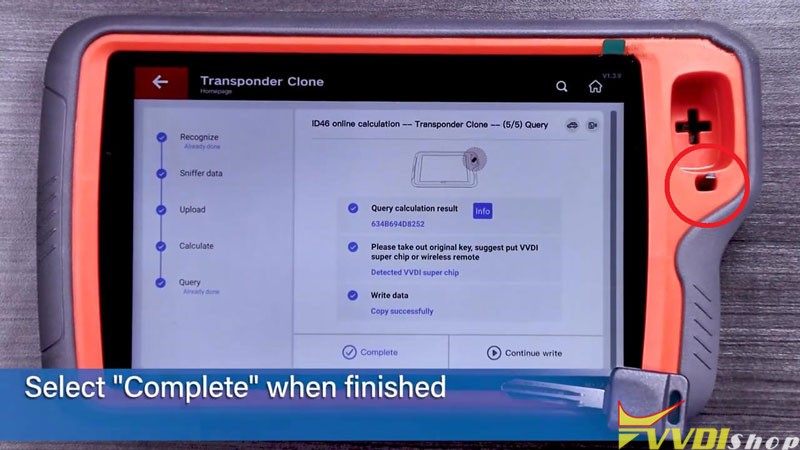
Take out the original key, put a VVDI Super Chip into Key Tool Plus coil.

Copy successfully.

Press “Complete”.

Xhorse VVDI Key Tool Plus Clone 2015 Nissan Rogue  via Super Chip 2

Xhorse VVDI Key Tool Plus Clone 2015 Nissan Rogue  via Super Chip 3

Xhorse VVDI Key Tool Plus Clone 2015 Nissan Rogue  via Super Chip 4

  • Cut Key

Install the programmed Super Chip into the blank key.


Here we go to Condor XC-009 machine.

Place original key on guide clamp while blank key on cut clamp.


Check the spacing and tip alignment.

Then start to cut.

Xhorse VVDI Key Tool Plus Clone 2015 Nissan Rogue  via Super Chip 5

Xhorse VVDI Key Tool Plus Clone 2015 Nissan Rogue  via Super Chip 6

Xhorse VVDI Key Tool Plus Clone 2015 Nissan Rogue  via Super Chip 7
  • Program Key
  1. Insert original key into ignition to start the vehicle.
  2. Once running and all dash lights are off. Remove the original key and use new key to start the vehicle.


If vehicle starts normally, which means the key was successfully programmed.

Xhorse VVDI Key Tool Plus Clone 2015 Nissan Rogue  via Super Chip 8

Done!


https://www.vvdishop.com/

Comments

Popular posts from this blog

Will VVDI Key Tool Plus Program VAG MQB49 Key

  How to program VAG MQB49 key with   xhorse vvdi key tool plus ? This is a frequently asked question. Here’s the clue. Only  Johnson Control instrument is supported by  xhorse . Xhorse key tool plus or vvdi2 will only add key to MQB49 (still need sync data), they cannot do MQB49 all keys lost. 1. Calculate immo data online Try to read immo data with key tool plus, if failed to read immo data (shown as error image below). You need to obtain sync data from 3rd party. 2 Check immo status Display the number of vehicle keys, whether current key is locked and whether is dealer key and other information   3. Generate dealer key Load immo data file to generate dealer key, support generate normal dealer key and OME key (online)   4. Leanr key Learn the new generated key and original key into the car together, keys that are not learned will not be able to start the car.   5. Modify MQB49 key ID

How to Add Key 2019 VW POLO MQB49/5C by Xhorse VVDI Key Tool Plus

  Today 2019 VW POLO MQB49/5C add key success. Used   Xhorse vvdi key tool plus pad   for the whole process. Add key mqb platform (Johnson cluster and new MQB49/5C type on key tool plus are online. Read data with pad, then sent it for online calculation (cost  1 token  – must be charged before). You have to use a token to add a spare key from working key. After 3 minutes I got immo data file which automatically saved into the device. After that you make dealer key (used  Xhorse proxy MQB  style) and program to the car as usual. Test report from Mr.  Hrdina. 

Read MQB48 RH850 D70F3426 Dash by VVDI Key Tool Plus

  Xhorse tutorial: how to read VAG MQB48 NEC35XX locked RH850 D70F3426 processor dashboard with   Xhorse vvdi key tool plus   and RH850 cable.   Xhorse XDNPRBGL MQB-RH850/V850 Adapter  is designed to read VW MQB48 dashboard data without cutting/ lifting any pins. Support List: MQB-RH850 (R7F) MQB 34XX IMMO4 JCI 34XX Here take an example of RH850 D70F3426.   D70F3426 cluster is more complex than the regular RH850 cluster. You will need key tool plus, RH850 adapter and eeprom adapter   Procedure: 1.Read dashboard data The function requires network connection. Go to Immo Programming>>VW>>Select by Type>>MQB Immo System>>Dashboard-MQB48 (VDO/JCI-NEC35XX Locked) Then select Read Immo data>>Read NEC35XX Chip>>Soldering>>R7F703426 Check wiring diagram Follow wiring diagram to remove 4 capacitors solder RH850 adapter with cluster, then connect RH850 cable with key tool plus Read and save IMMO D...