Xhorse VVDI Key Tool Plus MQB49 5C 5D: Important Warnings

A new feature has been introduced to Xhorse VVDI Key Tool Plus for adding spare keys in the MQB 5C immobilizer system. This guide walks through the process while highlighting critical pitfalls to avoid, as a simple mistake can permanently disable a vehicle’s only key.


Step-by-Step Process

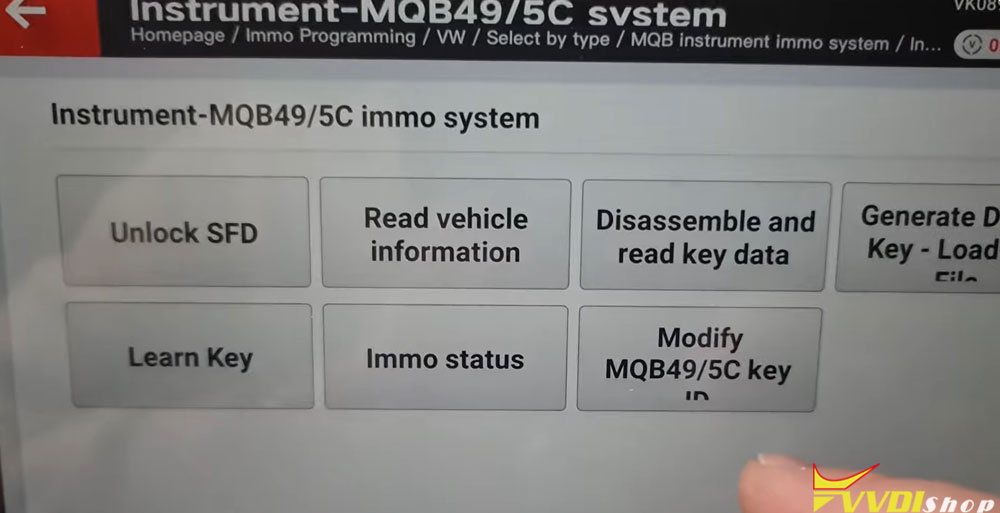
Accessing the Function: Start by selecting the vehicle brand (e.g., Volkswagen), then navigate to Immobilizer > MQB system. Choose the MQB49 5C specific system, in this case, Instrument MQB 495C (5C), and confirm the selection.

Xhorse VVDI Key Tool Plus MQB49 5C 5D: Important Warnings 1

Xhorse VVDI Key Tool Plus MQB49 5C 5D: Important Warnings 2

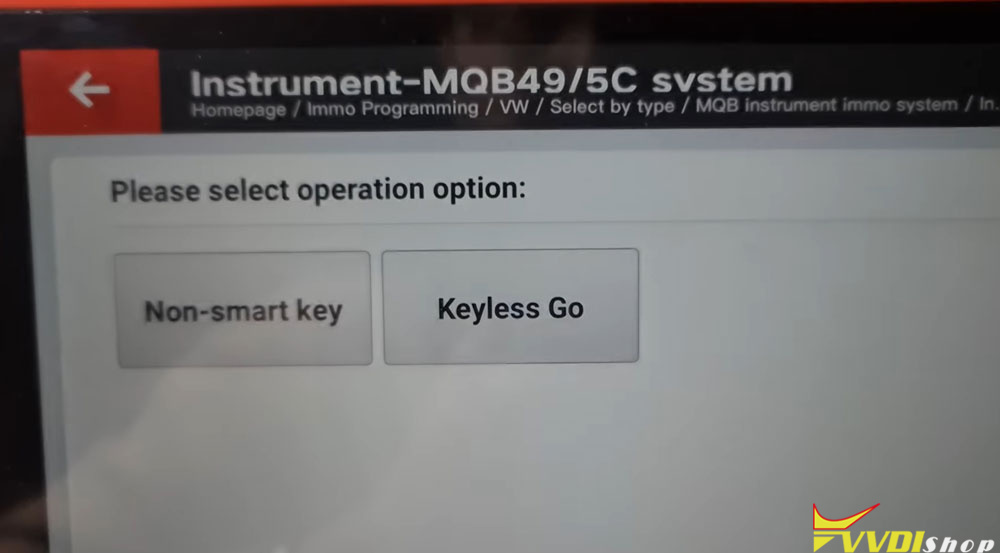
Reading the Key: Two main options appear for reading the key data: one for standard keys and another for “smart” keys. The correct choice depends on your key type. The crucial step is selecting the “Disassemble key and read data” option.

Xhorse VVDI Key Tool Plus MQB49 5C 5D: Important Warnings 3

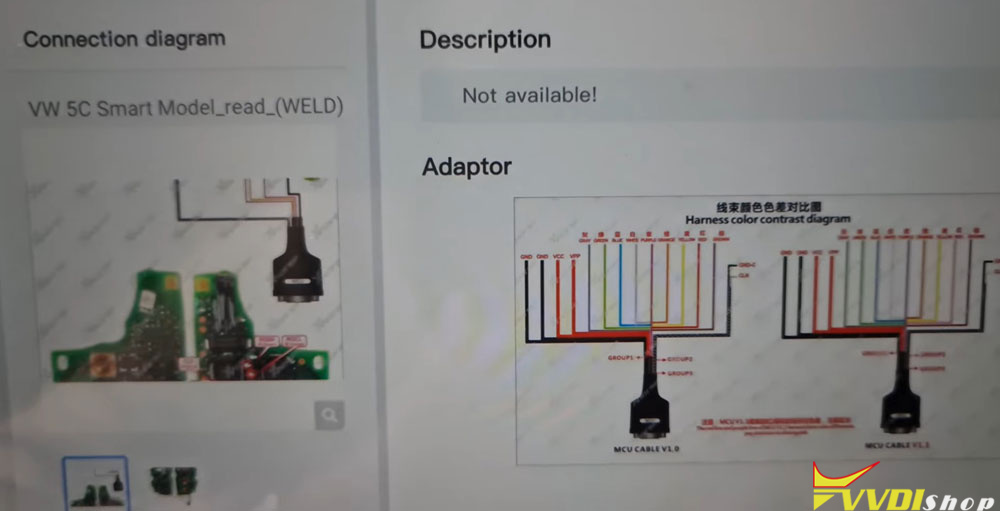
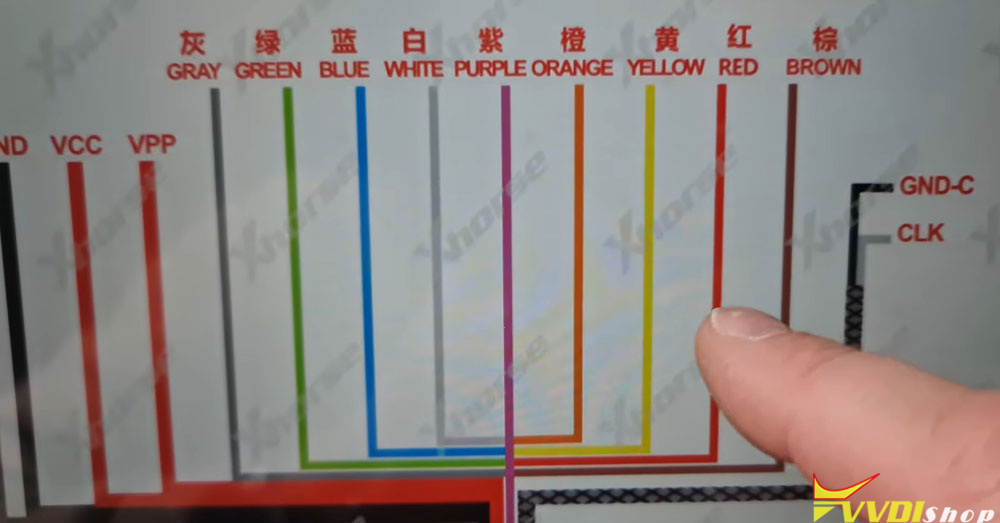
Critical Hardware Warning: The procedure requires connecting cables to the key’s circuit board. A major warning is issued here: the cable colors are misleading.

Two cable versions exist: MCU V1.0 and MCU V1.1.

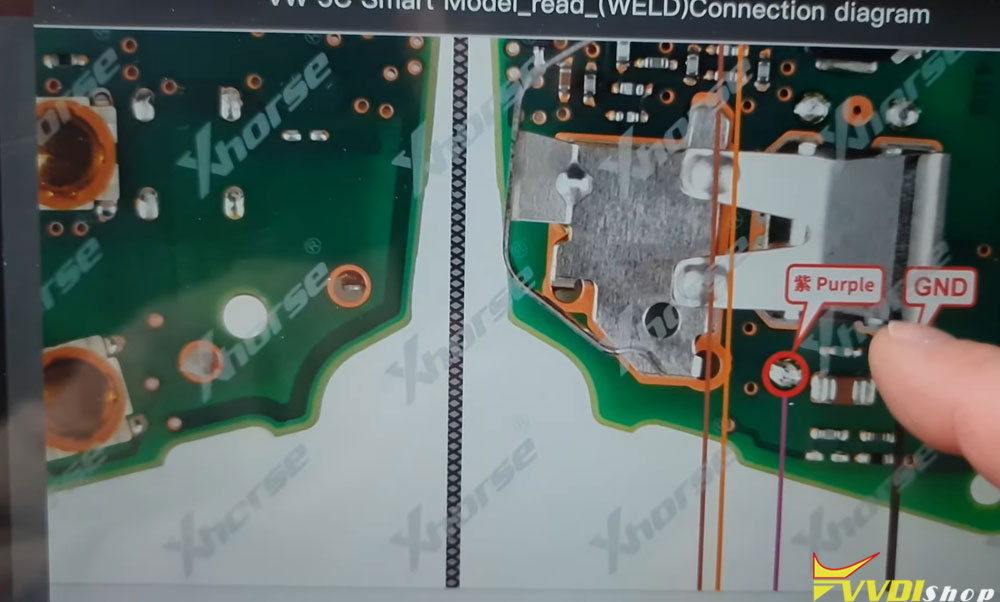
On the V1.1 cable, a wire marked “RED” on its insulation is physically purple. Connecting this purple wire to the key’s board because it’s labeled “red” will destroy the key.

Always follow the written label on the connector (e.g., “MCU V1.1”) and the on-screen pinout diagram, not the physical wire color.

Xhorse VVDI Key Tool Plus MQB49 5C 5D: Important Warnings 4

Xhorse VVDI Key Tool Plus MQB49 5C 5D: Important Warnings 5

Xhorse VVDI Key Tool Plus MQB49 5C 5D: Important Warnings 6

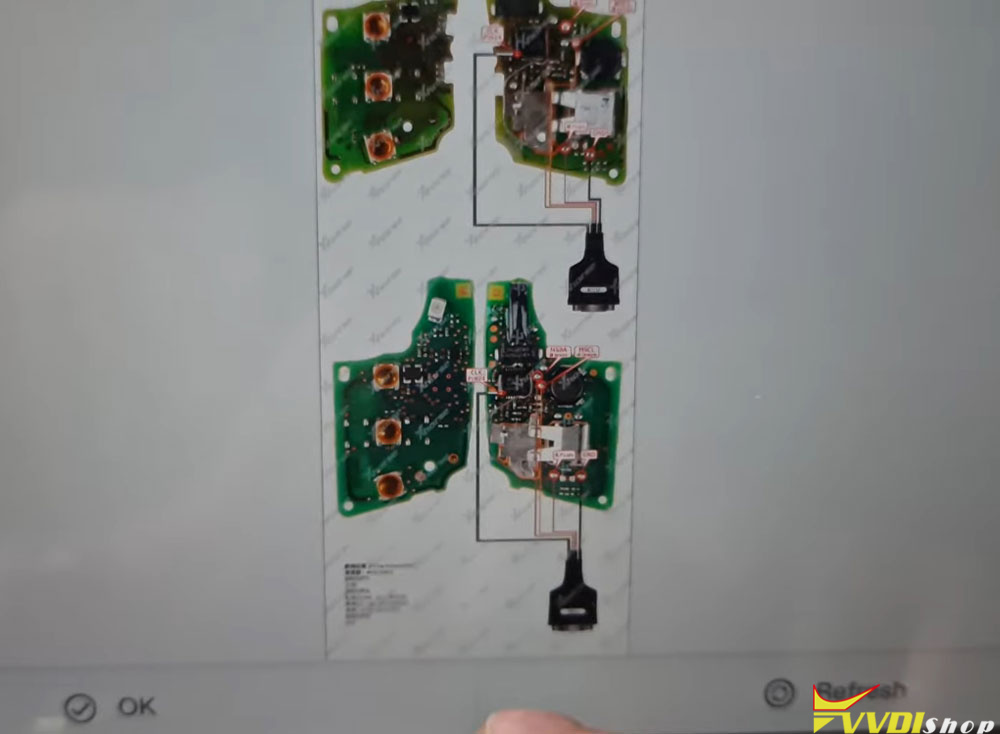
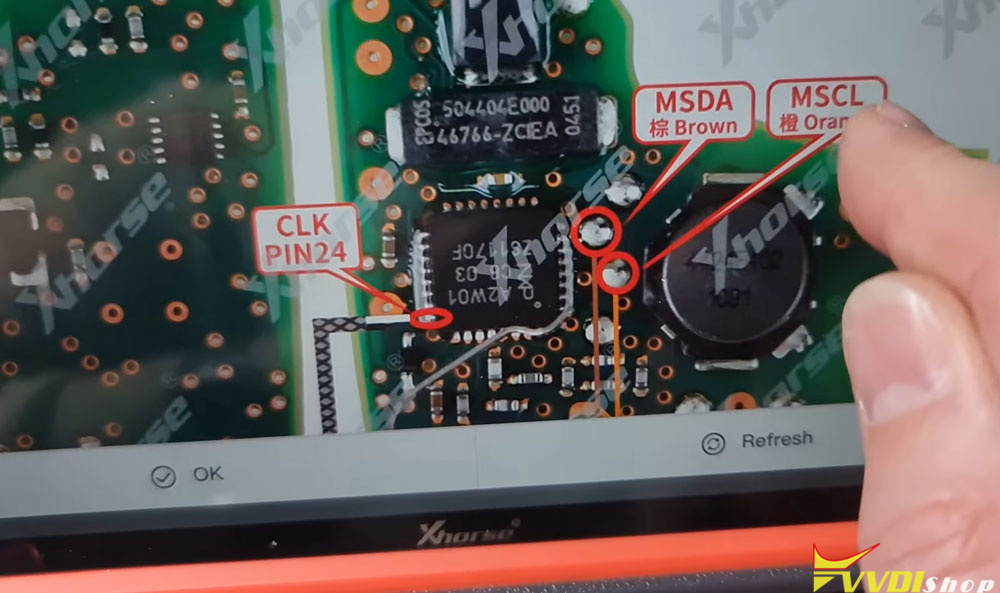
Soldering the Connection: The CLK (clock) cables are very short and must not be extended. They must be carefully soldered to specific processor pins (e.g., pin 24), as shown in the software’s diagram. Precision is essential to avoid short circuits.

Xhorse VVDI Key Tool Plus MQB49 5C 5D: Important Warnings 7

Xhorse VVDI Key Tool Plus MQB49 5C 5D: Important Warnings 8

Xhorse VVDI Key Tool Plus MQB49 5C 5D: Important Warnings 9

Key Identification: Before proceeding, check the key’s internal model number (e.g., 5D for newer models post-2023). Using the wrong procedure for an unsupported key type can immobilize the vehicle.

Reading Data: Once correctly connected, initiate the read process. A successful read provides the data needed to generate a new key.

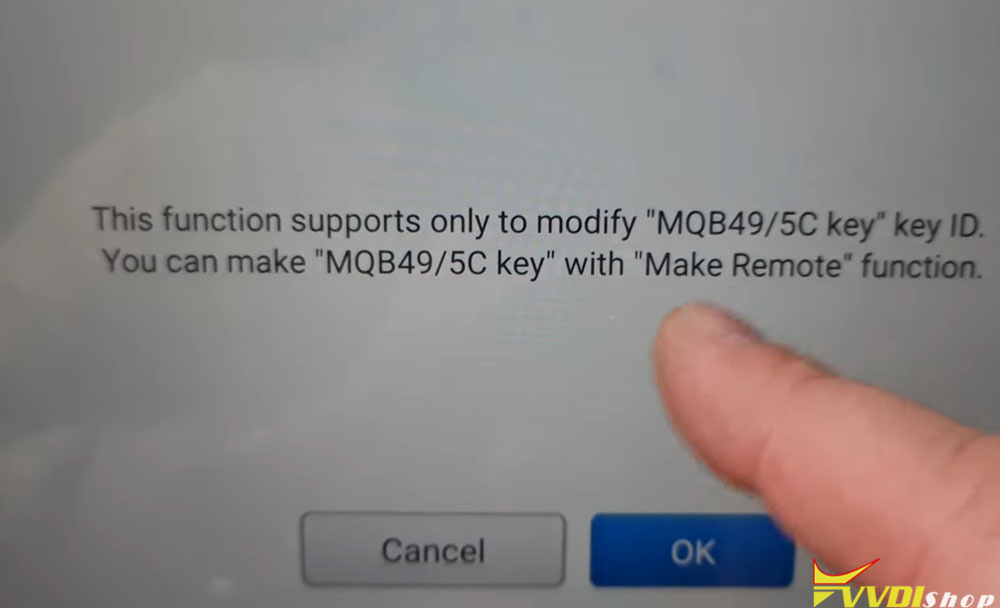
Additional Options: The software offers functions for keys with variable IDs, allowing you to rename them or create “clone” chips (which may only start the car without remote functions).

Xhorse VVDI Key Tool Plus MQB49 5C 5D: Important Warnings 10

Xhorse VVDI Key Tool Plus MQB49 5C 5D: Important Warnings 11

Important Notes for MQB 5D Keys

The process for newer 5D system keys (common from 2023) is similar but uses a different key design. The same critical cable warning applies: use the correct purple wire from the V1.1 cable set, not the one misleadingly labeled “red.”


Troubleshooting and Software Setup

If the MQB49 5C/5D functions don’t appear in your diagnostic tablet:

Ensure you have the latest database update (e.g., version 100 or newer).

The software mode must be version 140, 142, or 143.

The programmer (prog) version should be 187 or 188.

If options are missing after an update, try re-downloading and reinstalling the update package, as batch updates can sometimes fail.


General Advice and Conclusion

This tool is powerful but must be used with extreme caution and attention to detail. Always double-check connections against the diagrams, not the wire colors.


www.vvdishop.com

Comments

Popular posts from this blog

How to Add Key 2019 VW POLO MQB49/5C by Xhorse VVDI Key Tool Plus

  Today 2019 VW POLO MQB49/5C add key success. Used   Xhorse vvdi key tool plus pad   for the whole process. Add key mqb platform (Johnson cluster and new MQB49/5C type on key tool plus are online. Read data with pad, then sent it for online calculation (cost  1 token  – must be charged before). You have to use a token to add a spare key from working key. After 3 minutes I got immo data file which automatically saved into the device. After that you make dealer key (used  Xhorse proxy MQB  style) and program to the car as usual. Test report from Mr.  Hrdina. 

Will VVDI Key Tool Plus Program VAG MQB49 Key

  How to program VAG MQB49 key with   xhorse vvdi key tool plus ? This is a frequently asked question. Here’s the clue. Only  Johnson Control instrument is supported by  xhorse . Xhorse key tool plus or vvdi2 will only add key to MQB49 (still need sync data), they cannot do MQB49 all keys lost. 1. Calculate immo data online Try to read immo data with key tool plus, if failed to read immo data (shown as error image below). You need to obtain sync data from 3rd party. 2 Check immo status Display the number of vehicle keys, whether current key is locked and whether is dealer key and other information   3. Generate dealer key Load immo data file to generate dealer key, support generate normal dealer key and OME key (online)   4. Leanr key Learn the new generated key and original key into the car together, keys that are not learned will not be able to start the car.   5. Modify MQB49 key ID

Read MQB48 RH850 RF701401 Dash by VVDI Key Tool Plus

  Another   Xhorse RH850 adapter   tutorial: how to read VAG MQB NEC35XX RH850 DF701401 dashboard with   xhorse vvdi key tool plus   and RH850 cable. Procedure: Select Immo Programming>>VW>>Select by Type>>MQB Immo System>>Dashboard-MQB48 (VDO/JCI-NEC35XX Locked)-> Read NEC35XX Chip>>Soldering>>R7F701401 Check wiring diagram Remove components and solder  rh850 cable  with cluster Connect rh850 cable with key tool plus Read and save immo data Select  Get Immo data Upload rh850 DF702401 data save above to calculate immo data Then save immo data Now you can generate dealer key or learn key with the immo data   www.vvdishop.com