
VVDI Key Tool Plus Pad English Function Menu

 Hello locksmith friends, this is the first look of Xhorse VVDI Key Tool Plus Pad, today I’m gonna make an introduction for its overall functions.


As we can see, there are 8 functions on VVDI Key Tool Plus Pad homepage: immo programming, transponder clone, generate transponder, remote program, OBD diagnostic, prog, cutting key and update.
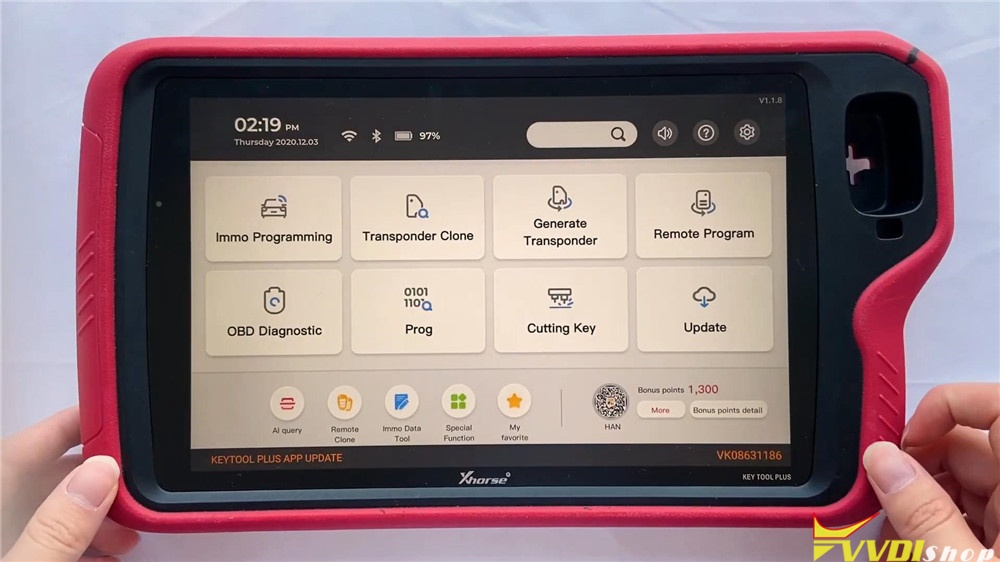
vvdi-key-tool-plus-function-menu-1


  1. Immo Programming

Go into immobilizer programming, we will find it supports many manufacturers, which classified by areas and brands. We can program keys for most cars such as Volkswagen, BMW, Audi, Mercedes Benz, Ford, Dodge, Chrysler, Porsche, Bentley, etc.

vvdi-key-tool-plus-function-menu-2


Let’s access VW, we can still select other cars on the left menu.

Select by type >> MQB instrument immo system

There are different car systems and operations available, we can select it by requirements. Or we can also use automatically diagnose models at first instead.

vvdi-key-tool-plus-function-menu-3

vvdi-key-tool-plus-function-menu-4

vvdi-key-tool-plus-function-menu-5

Let’s check Benz to have a look.

Select from system >> EIS tools >> Begin

It enables Benz to read write key, use EIS tools, prepare key file, calculate password and do other functions. EIS tools maybe the most often to use, go into the function, we can select the type to perform or use auto detect(CAN) directly.

vvdi-key-tool-plus-function-menu-6

vvdi-key-tool-plus-function-menu-7

vvdi-key-tool-plus-function-menu-8

vvdi-key-tool-plus-function-menu-9

  1. Transponder Clone

The right side big hole is a detection coil used for transponder clone. It is used to place remotes, generate and detect the transponder. Here you can find several copy ways for calculation including ID46, ID48(96 bit), ID4D, ID4E, 70/83, Toyota H(8A), etc.

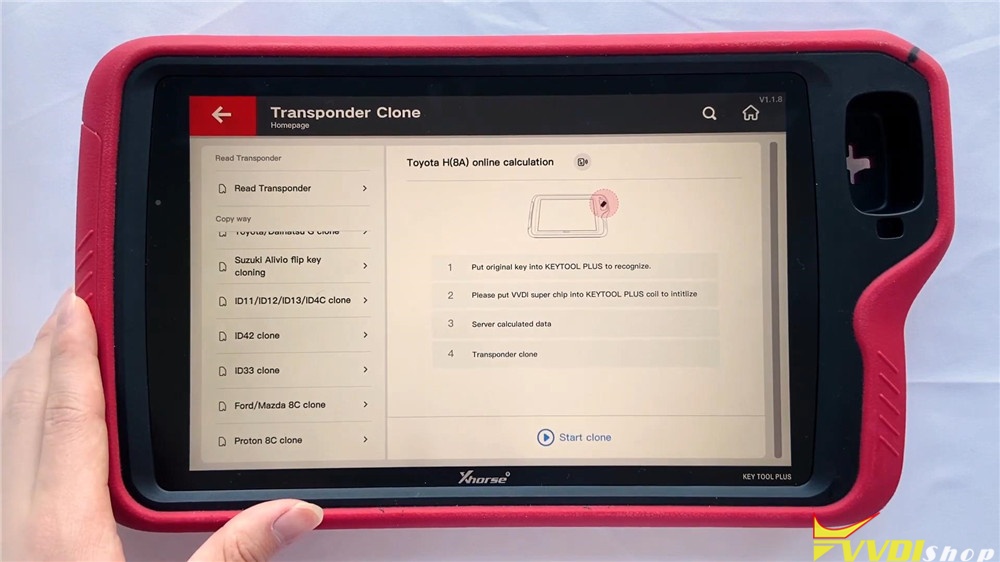
vvdi-key-tool-plus-function-menu-10

vvdi-key-tool-plus-function-menu-11


  1. Generate Transponder

Here you can search by transponder or car model, the chip list shows the types you can generate. Now go into ID46(PCF7936) chip, we can see here are several specific chips for selection.

vvdi-key-tool-plus-function-menu-12

vvdi-key-tool-plus-function-menu-13

  1. Remote Program

This function supports general remote for lots of car models we can check here. They are classified by areas and brands. let’s go into Land Rover:

Land Rover >> All remotes

It will display different Land Rover remotes to program.

vvdi-key-tool-plus-function-menu-14

vvdi-key-tool-plus-function-menu-15

  1. Prog

There are 8 modules in the function: EEPROM and FLASH, Immo, instrument, airbag, read ECU with CAN, data edit, ECU and other. It can read different types of EEPROM and flash data via adapter.


Let’s get into immobilizer BMW module, it supports different systems such as CAS3/CAS3+ and CAS4/CAS4+, we can read module data here via adapters directly.


In read ECU module, we can read different BMW engines here.


In other module, we can find FRM of BMW.

vvdi-key-tool-plus-function-menu-16

vvdi-key-tool-plus-function-menu-17

vvdi-key-tool-plus-function-menu-18

vvdi-key-tool-plus-function-menu-19

  1. Cutting Key

This function can connect with Dolphin XP005 Key Cutting Machine to control it. In the function including vehicle database, cut by bitting, universal key duplication, all key lost, find bitting , customize key data, history of cutting and machine parameter.

vvdi-key-tool-plus-function-menu-20


  1. OBD Diagnostic

This function has just been released several days ago and will be improved gradually.


  1. Update

We can update software here in time.


On the bottom of homepage screen, we can click the buttons to quick use AI query, remote clone, immo data tool, special functions or my favorite.


Full video of function overview:

This a brief function overview of new coming VVDI Key Tool Plus Pad diagnostic scanner. Any questions please contact us.

https://www.vvdishop.com/

http://blog.vvdishop.com/vvdi-key-tool-plus-pad-function-overview/

Comments

Popular posts from this blog

Will VVDI Key Tool Plus Program VAG MQB49 Key

  How to program VAG MQB49 key with   xhorse vvdi key tool plus ? This is a frequently asked question. Here’s the clue. Only  Johnson Control instrument is supported by  xhorse . Xhorse key tool plus or vvdi2 will only add key to MQB49 (still need sync data), they cannot do MQB49 all keys lost. 1. Calculate immo data online Try to read immo data with key tool plus, if failed to read immo data (shown as error image below). You need to obtain sync data from 3rd party. 2 Check immo status Display the number of vehicle keys, whether current key is locked and whether is dealer key and other information   3. Generate dealer key Load immo data file to generate dealer key, support generate normal dealer key and OME key (online)   4. Leanr key Learn the new generated key and original key into the car together, keys that are not learned will not be able to start the car.   5. Modify MQB49 key ID

How to Add Key 2019 VW POLO MQB49/5C by Xhorse VVDI Key Tool Plus

  Today 2019 VW POLO MQB49/5C add key success. Used   Xhorse vvdi key tool plus pad   for the whole process. Add key mqb platform (Johnson cluster and new MQB49/5C type on key tool plus are online. Read data with pad, then sent it for online calculation (cost  1 token  – must be charged before). You have to use a token to add a spare key from working key. After 3 minutes I got immo data file which automatically saved into the device. After that you make dealer key (used  Xhorse proxy MQB  style) and program to the car as usual. Test report from Mr.  Hrdina. 

Read MQB48 RH850 D70F3426 Dash by VVDI Key Tool Plus

  Xhorse tutorial: how to read VAG MQB48 NEC35XX locked RH850 D70F3426 processor dashboard with   Xhorse vvdi key tool plus   and RH850 cable.   Xhorse XDNPRBGL MQB-RH850/V850 Adapter  is designed to read VW MQB48 dashboard data without cutting/ lifting any pins. Support List: MQB-RH850 (R7F) MQB 34XX IMMO4 JCI 34XX Here take an example of RH850 D70F3426.   D70F3426 cluster is more complex than the regular RH850 cluster. You will need key tool plus, RH850 adapter and eeprom adapter   Procedure: 1.Read dashboard data The function requires network connection. Go to Immo Programming>>VW>>Select by Type>>MQB Immo System>>Dashboard-MQB48 (VDO/JCI-NEC35XX Locked) Then select Read Immo data>>Read NEC35XX Chip>>Soldering>>R7F703426 Check wiring diagram Follow wiring diagram to remove 4 capacitors solder RH850 adapter with cluster, then connect RH850 cable with key tool plus Read and save IMMO D...